

AI-Powered Ticket/Bug Creation From Sprint Feedback

The AI-Powered Ticket/Bug Creation feature helps you turn sprint feedback into actionable work in seconds.
When reviewing a completed sprint report, you can select a relevant text excerpt and ask Umaku to create either:
- a Ticket (for planned work/improvements), or
- a Bug (for defects/issues).
Umaku AI agents analyze your selected report content with sprint context and return a structured draft with a clear title and detailed description, so developers can move faster with better clarity.
This also improves future AI validation quality, including AI Code Review context.
Why this feature matters
Section titled “Why this feature matters”- Converts feedback insights into execution-ready work items
- Reduces manual writing effort and ambiguity
- Improves ticket/bug quality for engineering handoff
- Strengthens later AI review and validation context
What the feature does
Section titled “What the feature does”From a sprint feedback report, Umaku allows you to:
- Select meaningful text from the report
- Choose Create Ticket or Report Bug
- Generate an AI draft from selected text + report context
- Review and edit the draft
- Add ownership metadata (assignee, labels where supported)
- Create the work item
After creation, full details can still be updated in Kanban/Backlog/Bug pages.
How to use it
Section titled “How to use it”-
Open a completed sprint report
Section titled “Open a completed sprint report”Go to Project Feedback and open a report card for a completed sprint.
-
Select an actionable excerpt
Section titled “Select an actionable excerpt”Highlight the exact part of the report you want to convert into work.
Best practice:
- Select specific and concrete findings
- Include enough context to make the action clear
-
Choose action type
Section titled “Choose action type”From the selection actions, choose:
- Create Ticket
- Report Bug
-
Wait for AI draft
Section titled “Wait for AI draft”Umaku sends your selection and context to AI and returns:
- Draft title
- Draft description
-
Review and edit
Section titled “Review and edit”Before creating, you can:
- Edit title and description
- Add assignee(s)
- Add labels (ticket flow)
-
Create and continue execution
Section titled “Create and continue execution”Create the item. Then continue refinement in:
- Kanban/Backlog (tickets)
- Bug pages (bugs)
Ticket placement logic after creation:
- If there is an active sprint, the new ticket is added to the To Do column in that sprint.
- If there is no active sprint, the new ticket is added to the Ideas column in Backlog.
Ticket vs Bug path
Section titled “Ticket vs Bug path”Ticket creation
Section titled “Ticket creation”- Intended for planned improvements or follow-up actions
- Supports labels and normal planning flow
- Can be managed later in backlog/kanban
Bug creation
Section titled “Bug creation”- Intended for defects or reliability issues
- Focuses on issue ownership and resolution flow
- Can be managed later in bug details pages
Best practices for high-quality AI drafts
Section titled “Best practices for high-quality AI drafts”- Select a focused excerpt, not a vague paragraph
- Prefer problem statements with observable impact
- Keep one issue per work item when possible
- Always review the draft before submission
- Use precise labels for easier discovery and tracking
How this helps later AI review
Section titled “How this helps later AI review”Better initial ticket/bug drafts lead to better downstream AI analysis.
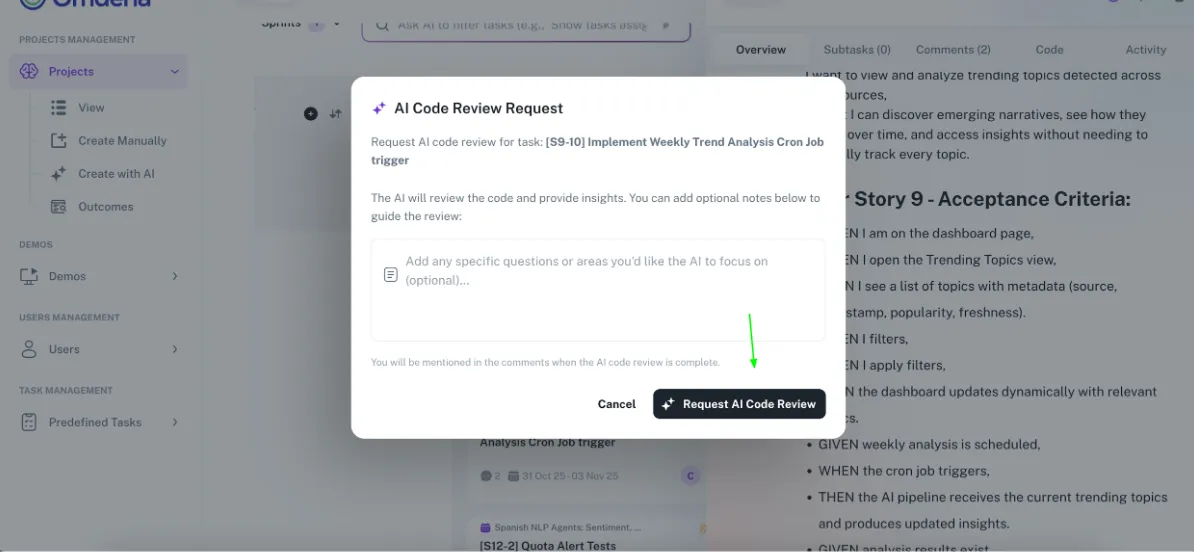
When you later trigger Request AI Code Review for the created ticket/bug, clearer title/description context improves:
- requirement-to-code alignment checks
- issue detection quality
- actionability of AI feedback